
-
 Getting Started
-
Sales Suite
-
Field Ops
-
Marketing
-
Service CRM
-
Developers
-
FloStack

Get Started

Sales Suite
Field Ops
Marketing
Service CRM
FloStack
Transformations Data in UDS
1. Feature Overview
Transformations in Universal Data Sync (UDS) let you manipulate and format mapped data before it is sent to an API or another destination.
They ensure that data is passed in the correct format, for example, phone numbers, dates, or strings — according to the receiving system’s requirements.
Transformation options vary depending on the field or variable type (e.g., String, Number, Date, Phone, etc.). You can either use predefined transformation options or write custom logic using LiquidJS in the transformation playground.
2. Navigate to Field Transformations
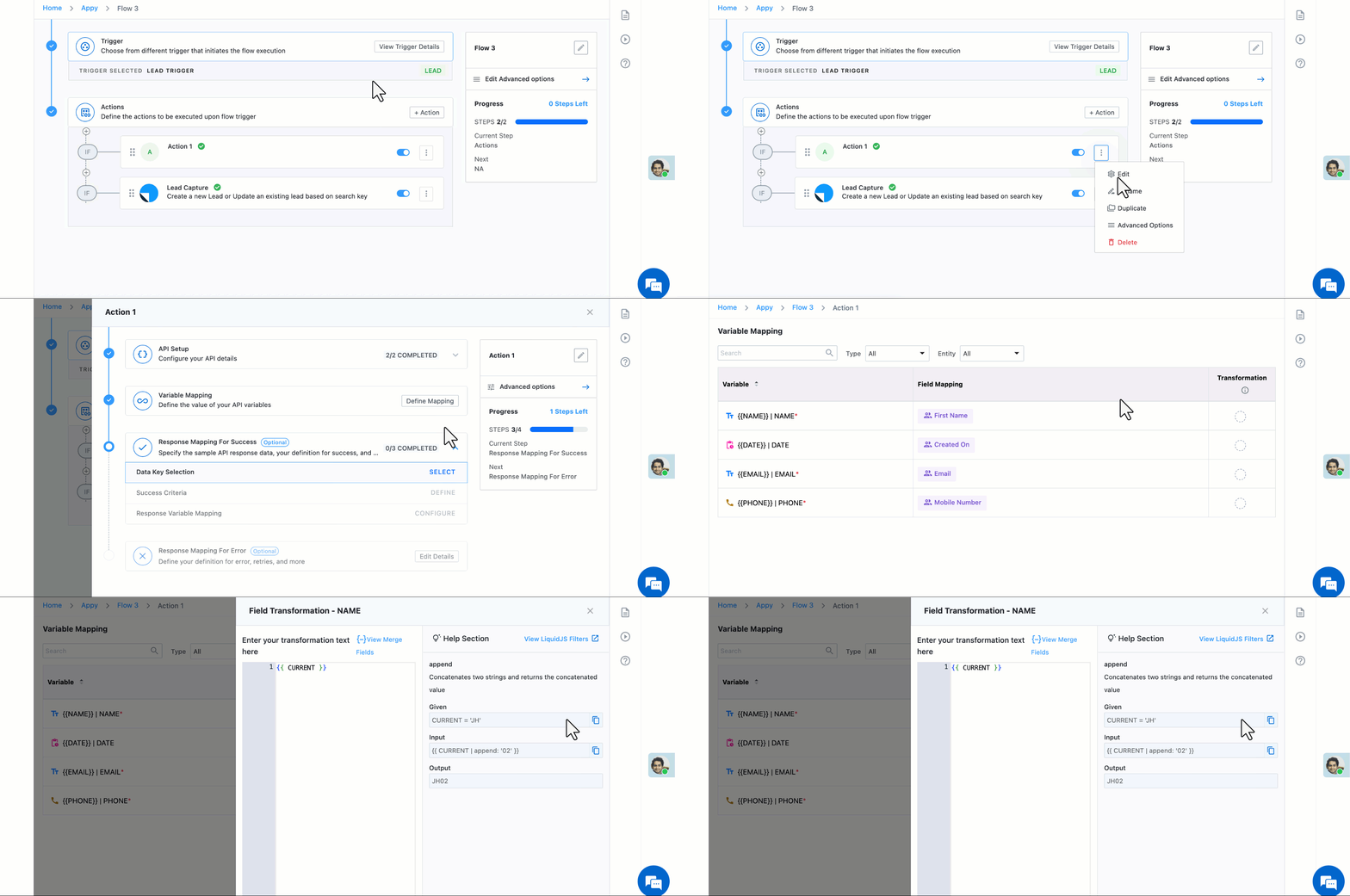
2.1 Transformations for API Actions
- Select an Action.
- Click Define Mapping next to Variable Mapping.
- Select the Transformation option next to a mapped Variable.
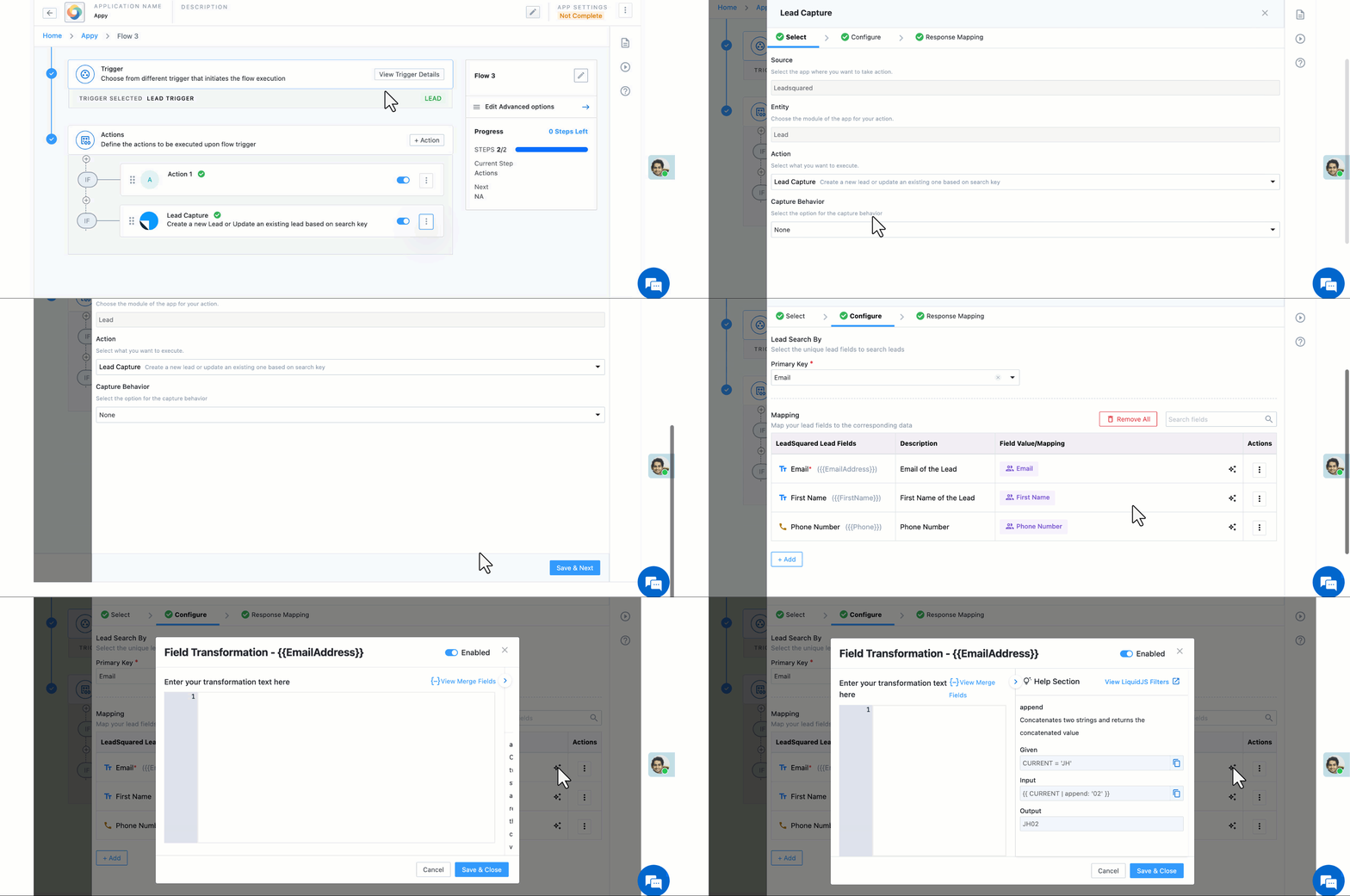
2.2 Transformations for Lead Actions
- Select a Lead Action.
- Navigate to the Configuration step.
- Select the Transformation (
 ) option next to a mapped Variable.
3. Types of Transformations
Each data type has a specific set of transformation options. Depending on what type you’ve selected while defining a variable or mapping a field, different configuration fields appear.
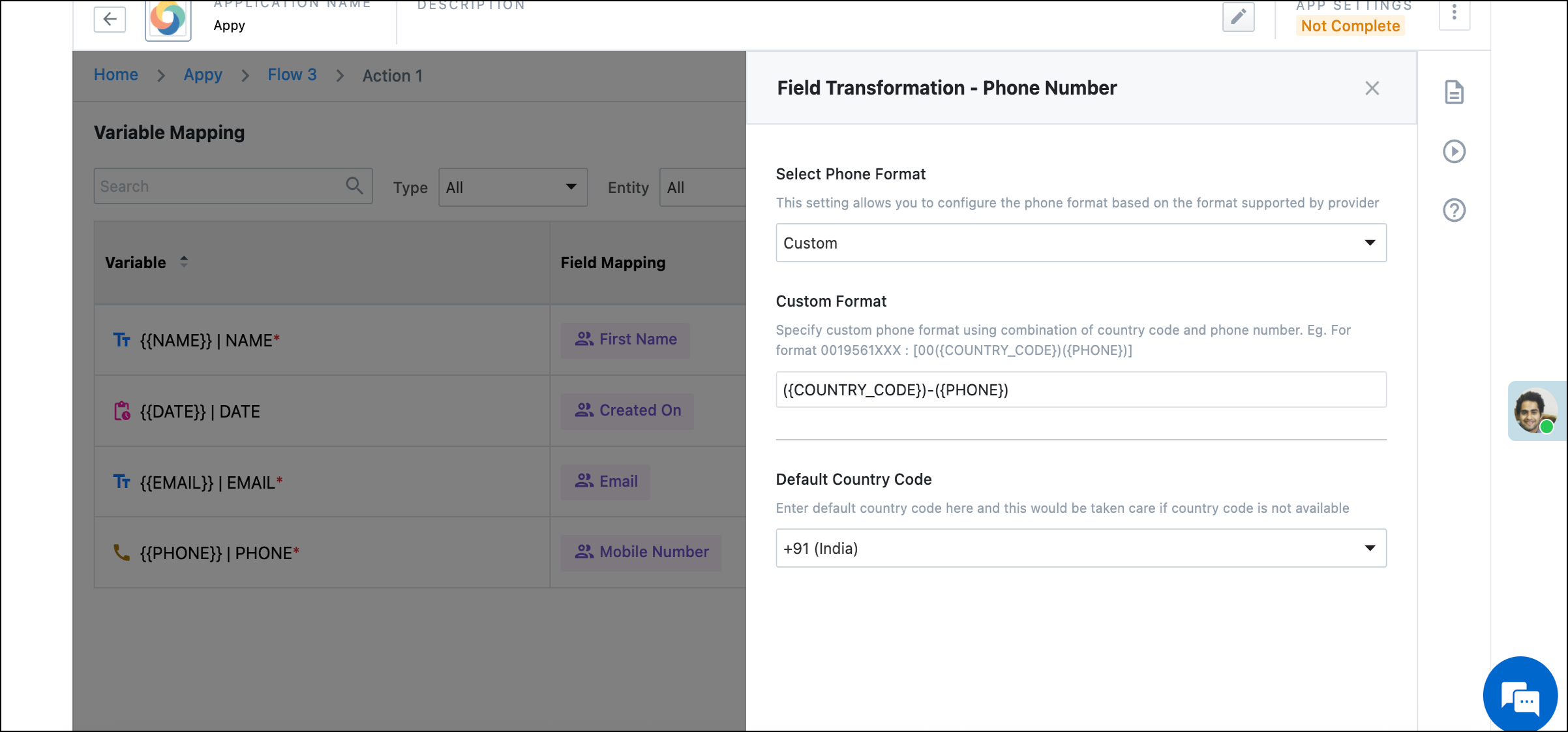
2.1 Phone Number Transformations
Used to reformat and standardize phone number values.
Example use case:
If phone numbers are stored in multiple formats (e.g., 00919876543210, +91-9876543210, 9876543210), you can transform them into a uniform format before sending them to an external system.
Configuration Steps:
- Select the field/variable of type Phone.
- Click Transformation.
- Choose a predefined phone format or create a custom format.
- Optionally, set a default country code (e.g., 91 for India).
- Save the transformation.
Example Output:
|
Input |
Transformation |
Result |
|
00919876543210 |
|
91-9876543210 |
|
9876543210 |
|
+91 9876543210 |
|
9876543210 |
|
00919876543210 |
Note: Any extra characters or spaces in the input are automatically cleaned before applying the transformation.
2.2 Date and Time Transformations
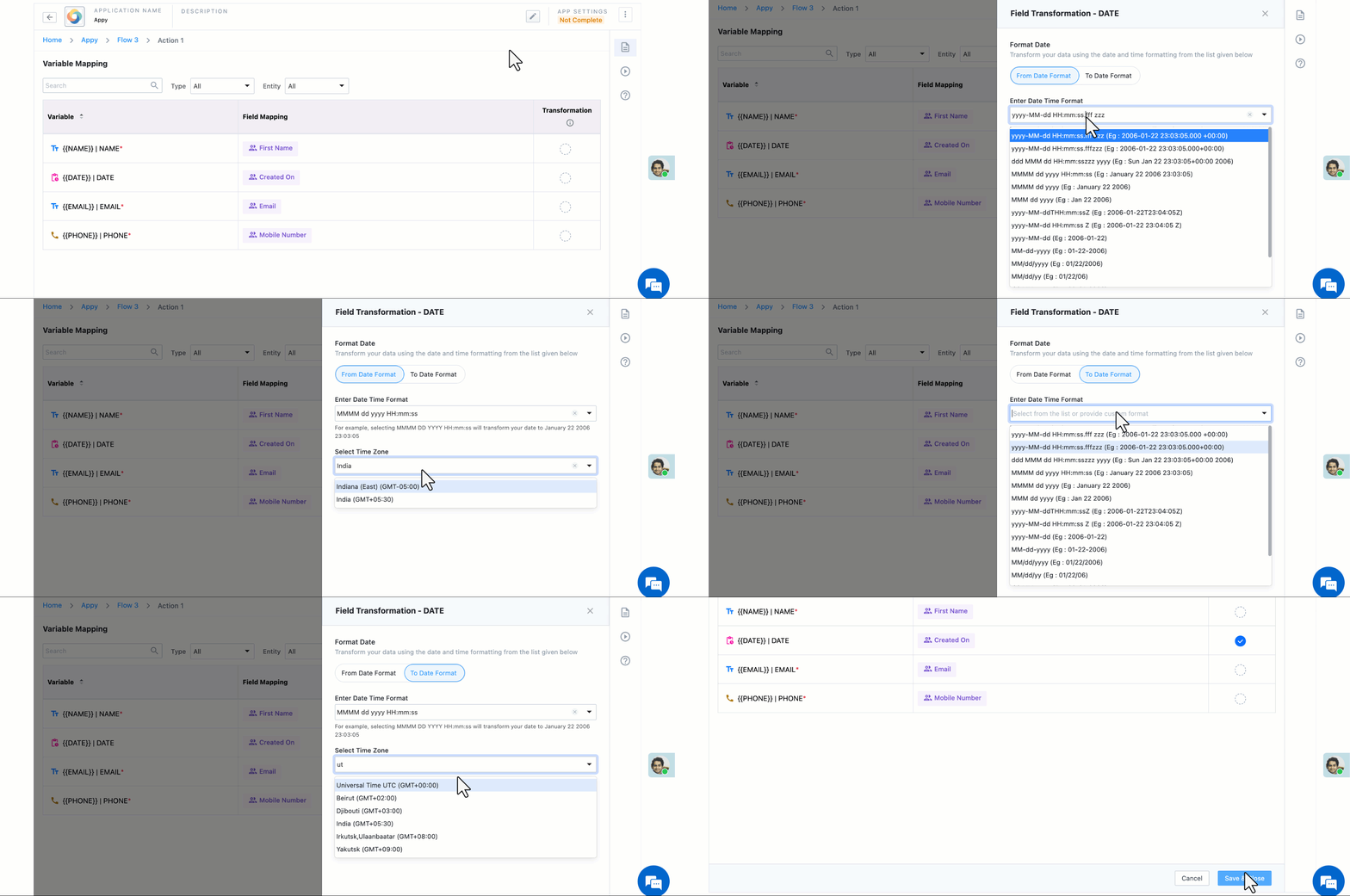
Used to restructure date/time formats or convert time zones.
Example use case:
If your API expects dates in YYYY/MM/DD format, but your system provides DD-MM-YYYY, you can transform the format automatically. You can also convert between time zones (e.g., from IST to UTC).
Configuration Steps:
- Select a Date or DateTime field.
- Click Transformation.
- Choose a predefined format (e.g., YYYY-MM-DD, DD/MM/YYYY) or define your own format.
- Optionally, specify:
- From Time Zone – the source time zone (e.g., IST)
- To Time Zone – the target time zone (e.g., UTC)
- Save the transformation.
Example Output:
|
Input |
Transformation |
Result |
|
10-23-2025 18:30:00 IST |
Convert IST → UTC |
10-23-2025 13:00:00 UTC |
2.3 String Transformations
Used to format, clean, or modify text-based values.
Example use case:
- Append or prepend text (e.g., add “Lead-” before a lead ID).
- Convert text to uppercase, lowercase, or title case.
- Trim extra spaces or symbols.
- Combine multiple string values.
Configuration Steps:
- Select a String field or variable.
- Click Transformation.
- Write LiquidJS code to modify the string.
Examples:
{{ CURRENT | upcase }}→ Converts to UPPERCASE{{ CURRENT | remove: ' ' }}→ Removes spaces{{ CURRENT | slice: 0, 5 }}→ Extracts first 5 characters{{ CURRENT | append: '02' }}→ Adds “02” to the end of the string.
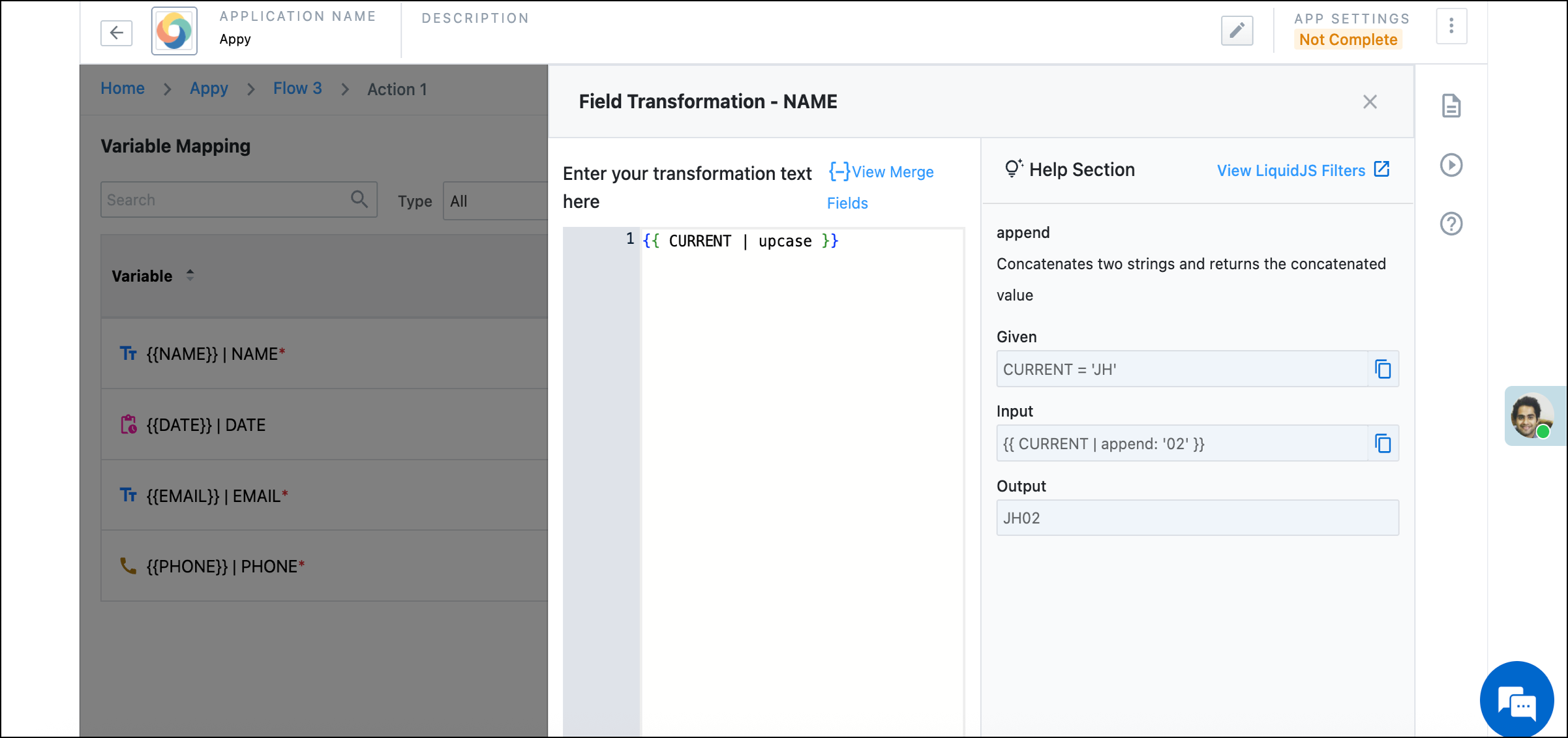
4. Custom Transformations
If none of the predefined options meet your requirement, use the LiquidJS playground to define advanced transformations.
3. Best Practices
- Always ensure the correct data type is assigned to a variable.
- Example: If you select “String” for a phone number, you won’t see phone-specific transformations.
- Use the preview (if available) to test your transformation output before saving.
- For complex logic, write and test LiquidJS expressions using an online Liquid playground before adding them to UDS.
- Keep transformations minimal to maintain clarity and avoid unexpected results.
FAQs
1. Can I apply multiple transformations on the same field?
No, each field supports a single transformation rule. You can, however, include multiple filters or conditions in LiquidJS code.
2. What happens if the transformation fails?
If the transformation logic is invalid or produces an unexpected result, the flow may fail during execution. Review logs under UDS Logs to troubleshoot.
3. Are transformations reversible?
No, transformations are one-way. Once applied, the transformed value is sent to the target API.
4. Can I reuse transformation logic across multiple fields?
Currently, transformations are defined at the field level. You can copy LiquidJS logic manually if needed.